In conjunction with my first assignment for User Experience in Practice, I downloaded an app called AnyList for the purposes of competitive benchmarking and also to gain some experience using list-making software for an everyday task. After downloading the app (it was free, although premium features may be unlocked for $7.99 for 1 year), I created a quick grocery list. Creating lists in AnyList is easy and I like that the app automatically sorts your items into categories (Dairy, Produce, Personal, etc.). Though I was disappointed that the system did not recognize “half and half” as a dairy product, I was able to figure out quickly how to move this item from the “Other” category to the “Dairy” category. The app also has some helpful features, such as the ability to add photos, quantities, and prices for items. Users can save frequently purchased items as Favorites, and create shopping lists from recipes. With a Premium membership, users can access more specialized features such as a tool that compares prices across different stores. Since my list was short and I was in a hurry, I put the app’s other options on the backburner for later exploration.

Once I arrived at the grocery, I found that crossing items off my list as I went through the store was as easy as tapping the item, then tapping again to un-cross it if I made a mistake. My main pain point in using the app while shopping was having to dig my phone out of my coat pocket and unlock it every time I wanted to check my list and cross items off. Of course, I could change the settings on my phone so it won’t go to sleep and keep it in the basket of my cart for easier access, but the risk of theft, not to mention the drain on battery life, prevents this from being a viable option. Keeping my phone in hand is also impractical, because I would not be able to browse shelves easily and I would face an increased risk of dropping the phone or setting it down on a shelf and forgetting about it. Overall, I had an enjoyable new user experience, but the practical realities of using my phone at the grocery store prevents me from converting to using this kind of technology instead of a traditional pen and paper list.
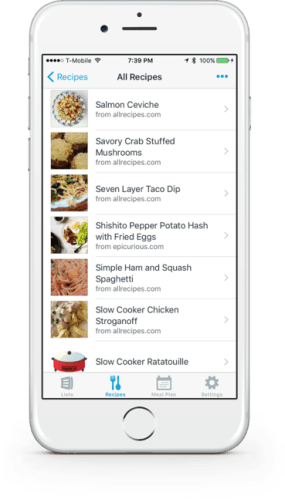
The Recipe section of AnyList has some real potential to help users be more organized in the kitchen. In preparation to cook a meal I usually look up recipes on my tablet, which I set at my workstation for ready reference. This has become the rule rather than the exception as I continue to rely less on printed recipes. By allowing users to browse for recipes on the web, then import or copy and paste the ingredients and steps, AnyList could be used as an all-in-one guide and library for home cooks. This sounds great in theory, but the first issue I encountered when I tried out the feature is its rather limited access to recipe sites. For example, there is no quick way to import recipes from America’s Test Kitchen, which is a site I subscribe to and use most commonly. As a workaround, I copied and pasted a recipe (ingredients first, then steps) from ATK – easy enough – but then I noticed sections for storing notes, amounts, source name, URL, and nutrition info. That all sounds pretty cool, too… except that I would have to spend time accessing, organizing, and cataloging all that information. Why would I want to do all that when I could just go directly to my chosen website, which has already done all that work for me and displays it in the aesthetically-pleasing and logical way to which I am accustomed? Perhaps a better use of this feature would be for blogs, poorly organized sites, and less frequently-used sites. Thus, my first impression of using AnyList for recipes is similar to that of my grocery list experience: it has cool features and is fairly easy to figure out and use, but it’s not so much more convenient that I would be willing to adopt it as my primary method for recipe storage.
 Anne Sawyer